
mold inspection software
Mold Inspection Software With a Dedicated Workflow
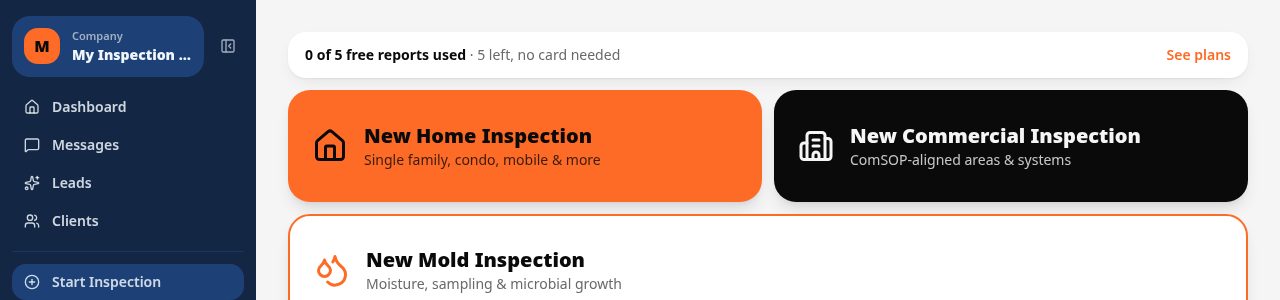
Inspect Ace includes a quick mold inspection workflow built around the 10 areas of concern inspectors actually walk. Shoot photos in each area, let the assistant draft a finding for you to accept, and finish with a mold-specific report carrying its own disclaimers and your company contact details.
What you get with mold inspection software
Dedicated mold inspection workflow
A quick mold inspection flow organizes the walkthrough around 10 areas of concern, so you move through the property in the order a mold assessment actually happens instead of forcing it into a general home template.
AI drafts findings from your photos
Photograph a stained ceiling tile or a damp sill plate and the assistant drafts a finding for that area. You review it and accept, edit or discard it before anything reaches the report.
Retry with a title hint to correct the AI
If the first draft is off, type a short title hint, such as 'window condensation, not roof leak', and retry. The assistant redrafts the finding around your correction instead of forcing you to rewrite it from scratch.
Reorder photos and areas
Drag photos and areas of concern into the order that matches how you actually walked the property, so the finished report reads in a logical sequence for the client.
Mold-specific report with its own disclaimers
The generated report is built for mold findings: an executive summary sits under Areas of concern, and the document carries mold-specific disclaimer language plus your company's contact details, not a repurposed home inspection template.
Lab result PDFs with AI summaries
Attach the lab's PDF results to the relevant area and Inspect Ace generates an AI summary of the lab findings alongside the attachment, so the client sees a plain-language read without digging through lab formatting.
How the workflow runs
- 1
Open the quick mold workflow
Start a mold inspection from the client file and walk the 10 built-in areas of concern in order, capturing photos at each one.
- 2
Let AI draft each finding
For every area with photos, accept the AI-drafted finding, retry it with a typed title hint if it needs correcting, or write your own.
- 3
Attach lab results
Upload the lab's PDF once results come back. Inspect Ace summarizes the lab PDF with AI so the finding and the summary sit together.
- 4
Deliver the mold report
Generate the branded mold report, with its own disclaimers, an executive summary, and your company contact details, then send it to the client.
Why teams switch
- Walk every mold inspection through the same 10 areas of concern, every time
- Cut write-up time with AI-drafted findings you confirm instead of typing from scratch
- Correct a draft in one retry with a typed hint instead of rewriting it
- Reorder photos and areas so the report reads the way you actually inspected
- Turn lab PDFs into a readable AI summary attached right to the finding
- Deliver a mold-specific report with the right disclaimers and your contact details built in
How Inspect Ace speeds up a mold inspection
Mold inspections live or die on how fast you can turn a walkthrough into a document a client will actually read. Inspect Ace's quick mold inspection workflow is built around 10 areas of concern, so instead of improvising a structure on site, you move through the same sequence every time: the areas where mold actually shows up, in the order most inspectors already walk them.
The time savings come from the AI drafting step. At each area, you take photos of what you see, whether it's a stained drywall patch, a musty crawlspace or a condensation line on a window, and the assistant drafts a finding describing what the photo shows. You read it, accept it if it's accurate, edit it if it needs a tweak, or discard it and write your own. Either way, you're confirming or correcting text rather than composing it from a blank field for every single area.
If a draft gets it wrong, you don't have to throw it out and start over. Type a short title hint, something like 'efflorescence, not active growth,' and retry. The assistant redrafts the finding with that correction in mind, which is usually faster than rewriting the paragraph yourself, especially on areas three and four of a ten-area walkthrough when you're trying to keep moving.
- 10 built-in areas of concern keep every inspection consistent
- AI drafts a finding from your photo at each area
- Retry with a typed hint instead of rewriting from scratch
- Drag photos and areas into the order you actually walked
A report built for mold, not repurposed from a home inspection
A lot of software treats a mold job as a sub-section of a general home inspection template. Inspect Ace's mold report is its own document. The executive summary sits directly under Areas of concern, so the client sees the big picture before they scroll into the detail of each area, and the disclaimer language is written for mold findings specifically rather than reused from a general property condition report. Your company's contact details are built into the report as well, so the client always knows who to call with a question.
Each finding can carry a single estimated remediation cost, giving the client a number to plan around without turning the report into a full remediation bid. That keeps the report focused on documenting what you found and what it will likely take to address, which is what a client or their agent is actually trying to get out of the document.
Lab results that read clearly, not just attachments
Most mold jobs involve a lab result, whether it's an air sample or a swab sent out after the walkthrough. Instead of leaving the client to open a dense lab PDF and interpret it themselves, Inspect Ace attaches the lab's PDF to the finding and generates an AI summary of what's in it. The summary sits next to the attachment, so a client or their agent gets a plain-language read of the lab data alongside the raw document.
Photo handling is flexible too. If you or a client has photos sitting in a Google Drive folder or shared through a link rather than on your phone, you can import them directly into the inspection instead of re-shooting or manually transferring files.
Why it costs less than hiring a second system
Inspect Ace runs the mold workflow, the report, lead and booking under the same account you already use for home or commercial inspections. Core is $39 a month for one inspector with unlimited inspections, and Pro is $99 a month for up to three inspectors, with 5 free reports to try it with no card required. There's no separate mold-specific license to buy and no second login to manage alongside your main inspection software.
See it on screen
What it costs vs other tools
| Software | Starting price | Free start |
|---|---|---|
| Inspect Ace | $39/mo Core, $99/mo Pro (3 inspectors) | 5 free reports, no card |
| Inspector Toolbelt | $79/mo | See vendor site |
| Spectora | From $109/mo | See vendor site |
Competitor prices from their public pricing pages, checked October 2026.
mold inspection software questions
- Is there a dedicated mold inspection template?
- Yes. Inspect Ace includes a quick mold inspection workflow organized around 10 areas of concern, separate from the general home and commercial templates.
- Does the AI write the whole finding for me?
- It drafts a finding from the photo you took in that area, but you decide whether to accept it, edit it, retry it with a title hint, or discard it. Nothing reaches the report without your confirmation.
- Can I attach lab results to the report?
- Yes. Attach the lab's PDF to the relevant area and Inspect Ace generates an AI summary of the lab results that appears alongside the attachment in the report.
- Does the mold report use the same disclaimers as a home inspection?
- No. The mold report is its own document with disclaimer language written for mold findings, plus your company contact details, rather than a reused home inspection template.
- Can I import photos from a shared folder instead of my camera roll?
- Yes. You can import photos from Google Drive or a share link in addition to shooting them directly in the app.
- Do I need separate software just for mold inspections?
- No. The mold workflow, AI-drafted findings, lab attachments and mold-specific report are part of the same Inspect Ace account used for home or commercial inspections.
- What does the executive summary cover in a mold report?
- The executive summary sits directly under Areas of concern in the report, giving the client an overview of the findings before they read the detail on each of the 10 areas.
- Can I show one remediation cost estimate per finding?
- Yes. Each finding can carry a single estimated remediation cost so the client has a number to plan around.
Also does home and commercial inspections
Same account, same $39 price. No second subscription when a client asks for something different.
Related solutions
Run your next inspection on it
Your first 5 reports are free. No card, no app store, works on the phone in your pocket.